Use the W&B Python Library to log a CSV file and visualize it in a W&B Dashboard. W&B Dashboard are the central place to organize and visualize results from your machine learning models. This is particularly useful if you have a CSV file that contains information of previous machine learning experiments that are not logged in W&B or if you have CSV file that contains a dataset.

Import and log your dataset CSV file

We suggest you use W&B Artifacts to make the contents of the CSV file easier to re-use.
  1. To get started, first import your CSV file. In the following code snippet, replace the iris.csv filename with the name of your CSV filename:
import wandb
import pandas as pd

# Read our CSV into a new DataFrame
new_iris_dataframe = pd.read_csv("iris.csv")
  1. Convert the CSV file to a W&B Table to utilize W&B Dashboards.
# Convert the DataFrame into a W&B Table
iris_table = wandb.Table(dataframe=new_iris_dataframe)
  1. Next, create a W&B Artifact and add the table to the Artifact:
# Add the table to an Artifact to increase the row
# limit to 200000 and make it easier to reuse
iris_table_artifact = wandb.Artifact("iris_artifact", type="dataset")
iris_table_artifact.add(iris_table, "iris_table")

# Log the raw csv file within an artifact to preserve our data
iris_table_artifact.add_file("iris.csv")
For more information about W&B Artifacts, see the Artifacts chapter.
  1. Lastly, start a new W&B Run to track and log to W&B with wandb.init:
# Start a W&B run to log data
with wandb.init(project="tables-walkthrough") as run:

    # Log the table to visualize with a run...
    run.log({"iris": iris_table})

    # and Log as an Artifact to increase the available row limit!
    run.log_artifact(iris_table_artifact)
The wandb.init() API spawns a new background process to log data to a Run, and it synchronizes data to wandb.ai (by default). View live visualizations on your W&B Workspace Dashboard. The following image demonstrates the output of the code snippet demonstration.
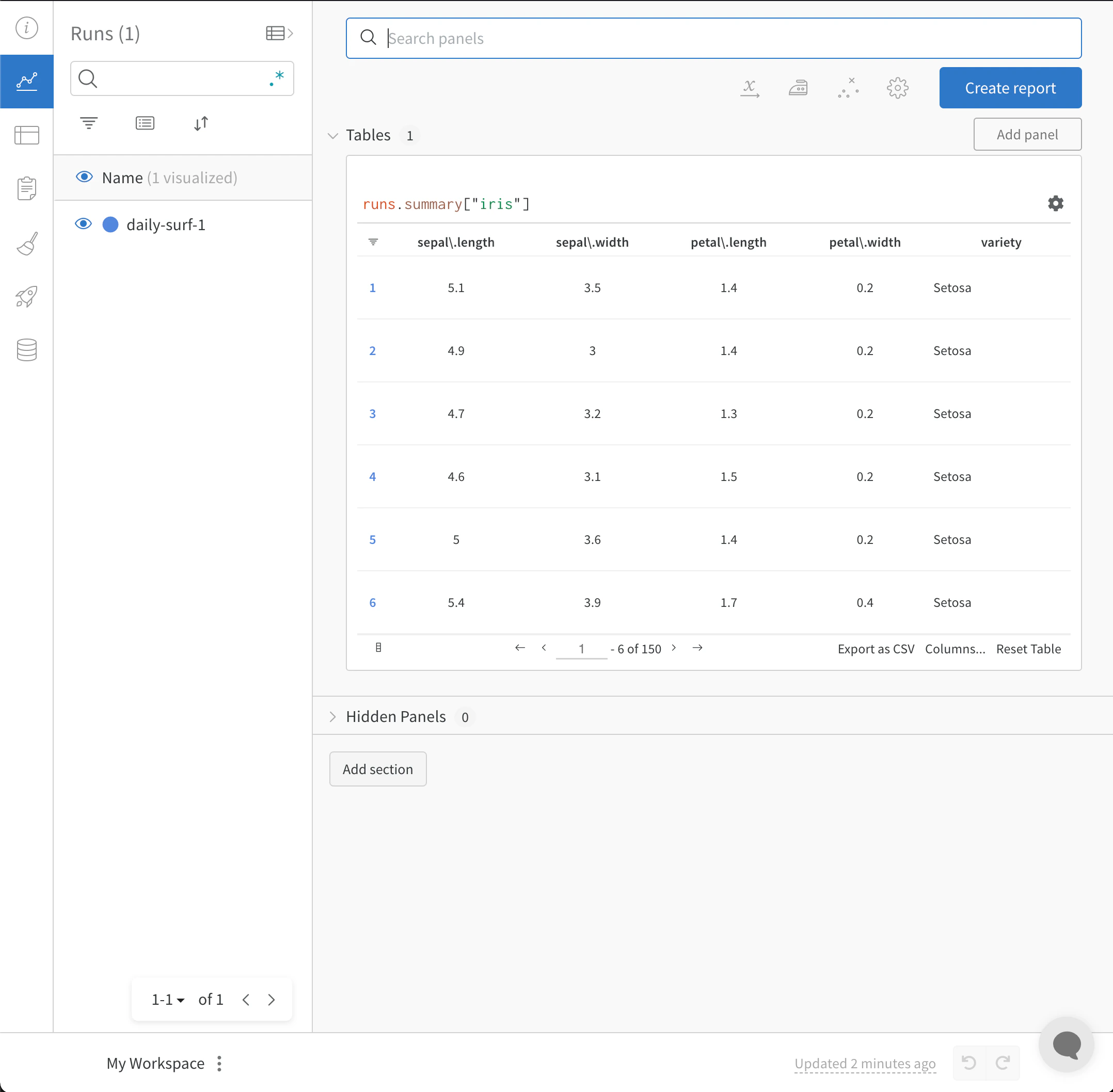
CSV file imported into W&B Dashboard
The full script with the preceding code snippets is found below:
import wandb
import pandas as pd

# Read our CSV into a new DataFrame
new_iris_dataframe = pd.read_csv("iris.csv")

# Convert the DataFrame into a W&B Table
iris_table = wandb.Table(dataframe=new_iris_dataframe)

# Add the table to an Artifact to increase the row
# limit to 200000 and make it easier to reuse
iris_table_artifact = wandb.Artifact("iris_artifact", type="dataset")
iris_table_artifact.add(iris_table, "iris_table")

# log the raw csv file within an artifact to preserve our data
iris_table_artifact.add_file("iris.csv")

# Start a W&B run to log data
with wandb.init(project="tables-walkthrough") as run:

    # Log the table to visualize with a run...
    run.log({"iris": iris_table})

    # and Log as an Artifact to increase the available row limit!
    run.log_artifact(iris_table_artifact)

Import and log your CSV of Experiments

In some cases, you might have your experiment details in a CSV file. Common details found in such CSV files include:
  • A name for the experiment run
  • Initial notes
  • Tags to differentiate the experiments
  • Configurations needed for your experiment (with the added benefit of being able to utilize our Sweeps Hyperparameter Tuning).
ExperimentModel NameNotesTagsNum LayersFinal Train AccFinal Val AccTraining Losses
Experiment 1mnist-300-layersOverfit way too much on training data[latest]3000.990.90[0.55, 0.45, 0.44, 0.42, 0.40, 0.39]
Experiment 2mnist-250-layersCurrent best model[prod, best]2500.950.96[0.55, 0.45, 0.44, 0.42, 0.40, 0.39]
Experiment 3mnist-200-layersDid worse than the baseline model. Need to debug[debug]2000.760.70[0.55, 0.45, 0.44, 0.42, 0.40, 0.39]
Experiment Nmnist-X-layersNOTES[…, …]
W&B can take CSV files of experiments and convert it into a W&B Experiment Run. The following code snippets and code script demonstrates how to import and log your CSV file of experiments:
  1. To get started, first read in your CSV file and convert it into a Pandas DataFrame. Replace "experiments.csv" with the name of your CSV file:
import wandb
import pandas as pd

FILENAME = "experiments.csv"
loaded_experiment_df = pd.read_csv(FILENAME)

PROJECT_NAME = "Converted Experiments"

EXPERIMENT_NAME_COL = "Experiment"
NOTES_COL = "Notes"
TAGS_COL = "Tags"
CONFIG_COLS = ["Num Layers"]
SUMMARY_COLS = ["Final Train Acc", "Final Val Acc"]
METRIC_COLS = ["Training Losses"]

# Format Pandas DataFrame to make it easier to work with
for i, row in loaded_experiment_df.iterrows():
    run_name = row[EXPERIMENT_NAME_COL]
    notes = row[NOTES_COL]
    tags = row[TAGS_COL]

    config = {}
    for config_col in CONFIG_COLS:
        config[config_col] = row[config_col]

    metrics = {}
    for metric_col in METRIC_COLS:
        metrics[metric_col] = row[metric_col]

    summaries = {}
    for summary_col in SUMMARY_COLS:
        summaries[summary_col] = row[summary_col]
  1. Next, start a new W&B Run to track and log to W&B with wandb.init():
    with wandb.init(
        project=PROJECT_NAME, name=run_name, tags=tags, notes=notes, config=config
    ) as run:
    
As an experiment runs, you might want to log every instance of your metrics so they are available to view, query, and analyze with W&B. Use the run.log() command to accomplish this:
run.log({key: val})
You can optionally log a final summary metric to define the outcome of the run using the define_metric API. This example adds the summary metrics to our run with run.summary.update():
run.summary.update(summaries)
For more information about summary metrics, see Log Summary Metrics. Below is the full example script that converts the above sample table into a W&B Dashboard:
FILENAME = "experiments.csv"
loaded_experiment_df = pd.read_csv(FILENAME)

PROJECT_NAME = "Converted Experiments"

EXPERIMENT_NAME_COL = "Experiment"
NOTES_COL = "Notes"
TAGS_COL = "Tags"
CONFIG_COLS = ["Num Layers"]
SUMMARY_COLS = ["Final Train Acc", "Final Val Acc"]
METRIC_COLS = ["Training Losses"]

for i, row in loaded_experiment_df.iterrows():
    run_name = row[EXPERIMENT_NAME_COL]
    notes = row[NOTES_COL]
    tags = row[TAGS_COL]

    config = {}
    for config_col in CONFIG_COLS:
        config[config_col] = row[config_col]

    metrics = {}
    for metric_col in METRIC_COLS:
        metrics[metric_col] = row[metric_col]

    summaries = {}
    for summary_col in SUMMARY_COLS:
        summaries[summary_col] = row[summary_col]

    with  wandb.init(
        project=PROJECT_NAME, name=run_name, tags=tags, notes=notes, config=config
    ) as run:

        for key, val in metrics.items():
            if isinstance(val, list):
                for _val in val:
                    run.log({key: _val})
            else:
                run.log({key: val})

        run.summary.update(summaries)